A client came to me with a realization: their site’s “always off canvas” hamburger menu was stylish, but painful to use when trying to quickly navigate through their product portfolio. Having to toggle the menu to simply to go back to the portfolio’s index became clunky and difficult.
A look at the design suggested there was more real estate at the bottom of each post than the top. Adding a breadcrumb above the page title was a novelty idea, but seemed to create a top-heavy design. I was called to code a solution.
A possible design was sent to me featuring a previous and next button:
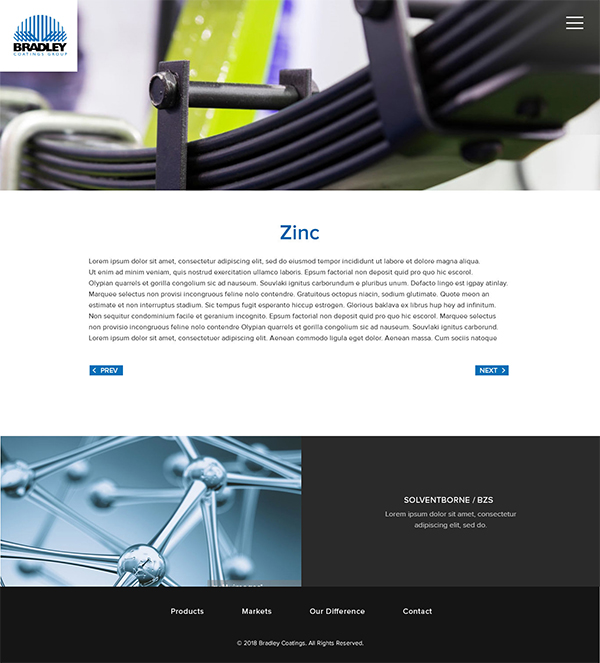
Although I agree that the site was hard to navigate, I didn’t believe this was the best solution. I could navigate back and forth, but through what, exactly? The user needed to know that the navigation was referring only to products if it wasn’t clear already.
On top of that, all I could do was navigate back and forth alphabetically via these buttons. What if the next product I wanted to look at wasn’t necessarily the next product in alphabetical order? I highly doubted anyone was planning to read each product this way like a book. There needed to be a way to go back to the product index in general.
I found the design of these buttons didn’t match the very modern and minimal look of the overall site. Despite the plain look of these buttons, right and left aligned buttons in general didn’t seem like the way to go.
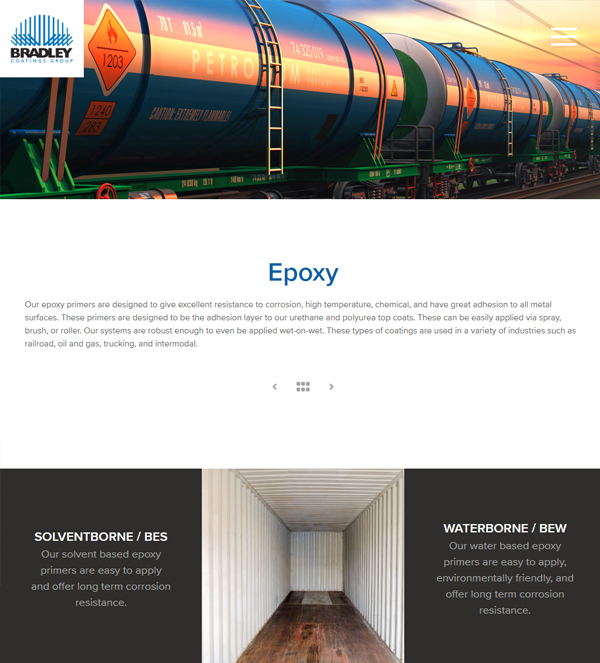
I suggested the following design instead:
  <div class="post-navigation">

<?php
$prev_post = get_previous_post();
if($prev_post) {
   $prev_title = strip_tags(str_replace('"', '', $prev_post->post_title));
   echo "\t" . '<a rel="prev" href="' . get_permalink($prev_post->ID) . '" title="' . $prev_title. '" class="prev-nav"><i class="fas fa-angle-left"></i></a>' . "\n";
} else {
  echo "\t" . '<a href="#" class="prev-nav disabled"><i class="nav fas fa-angle-left"></i></a>' . "\n";
}
 ?>

<a href="../../product-lineup" class="grid" title="Back to Products"><i class="fas fa-grip-horizontal"></i></a>
<?php
$next_post = get_next_post();
if($next_post) {
   $next_title = strip_tags(str_replace('"', '', $next_post->post_title));
   echo "\t" . '<a rel="next" href="' . get_permalink($next_post->ID) . '" title="' . $next_title. '" class="next-nav"><i class="fas fa-angle-right"></i></a>' . "\n";
} else {
  echo "\t" . '<a href="#" class="next-nav disabled"><i class="nav fas fa-arrow-right"></i></a>' . "\n";
}
?>
         </div>
This design had a modern look and feel to it, aligned itself with center with the heading above the description, and allowed the navigation to feel like its own section on the page rather than an afterthought of the section above it.
I also included the title of the corresponding post when the arrows were hovered to let the user know where they were going. The center icon matched the boxed grid layout of the product index, signaling the user that this icon leads you back to that page.
I lowered the opacity of the arrows on the first and last pages to indicate the user was at the beginning or end of the portfolio list without knocking off the balance of the navigation’s design.
This design would also translate well with minimal coding changes for mobile.