A company with two distinct services sought to create a website that featured content from both divisions. Each division was assigned a color that would be featured in various elements of the site’s theme to differentiate each service.
Through a clever implementation of a WordPress plugin called Advanced Custom Fields, a user could easily create color coded pages from templates that displayed and filtered content from the appropriate division, pictured.
The Problem:
An inspection of the site’s architecture revealed that the color coding was only being used for pages rather than posts, which meant that any dynamically generated content wouldn’t reflect the color coding. This became apparent when the client came to me requesting the addition of random related posts and a carousel slider featuring all posts on the homepage.
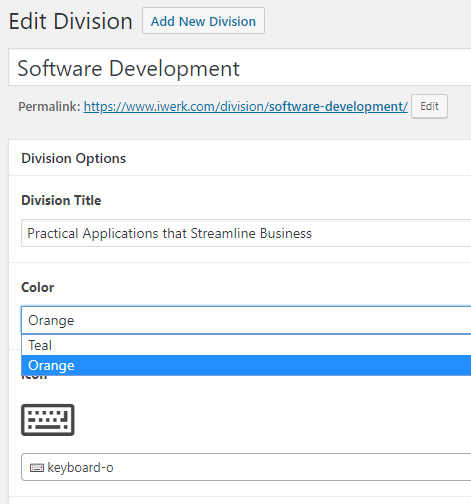
Too many steps:
ACF could be added to the post editor, allowing the client to select within each posts which color the post should be, but it seemed like an unnecessary step given that the colors correspond with the taxonomy. It seemed ideal to hook CSS to each post’s taxonomy rather than create a custom field for it. That would automate the posting process a bit more.
ACF Queries:
When displaying posts, ACF’s default interface only allowed the user to select specific posts one by one. There were no available settings to simply query random posts from each division and set their arguments. Even when implemented correctly, the posts still needed to somehow pull the right CSS class to represent their respective divisions
Goal:
- Create queries that pull all posts from a certain taxonomy rather than having the user select specific posts one by one
- Allow such posts to be pulled in random order
- Attach CSS to post taxonomies to ensure they are color coded in dynamically generated sections of the site without adding a new step in the posting process
Solution:
Creating queries
The first ask was to create the correct queries in ACF to dynamically pull all / random posts in a post gallery based on the existing taxonomy. This query needed to allow the user to select which taxonomy to use on the front end:
The following code allows for posts from a selected taxonomy to be pulled in random order and excludes the current post from the query:
<?php
$post_terms = wp_get_object_terms($post->ID, 'type', array('fields'=>'ids'));

$args = array(
    'posts_per_page' => '3',
    'post_type' => 'iwerk_case_study',
    'post__not_in' => array($post->ID),
    'orderby' => 'rand',
    'tax_query' => array(
        array(
            'taxonomy' => 'type',
            'field' => 'id',
            'terms' => $post_terms,

        )
    )
);
$the_query = new WP_Query( $args );
if ( $the_query->have_posts() ) {
        echo '';
    while ( $the_query->have_posts() ) {
        $the_query->the_post();
        $case_study = get_sub_field('division_case_study');
        $case_study_id = $case_study->ID;
        $case_study_title = get_the_title($case_study);
        $screen = get_field('homepage_image', $case_study_id);
        $description = get_field('short_description', $case_study_id);
        $thumbnail = get_field('thumbnail_image', $case_study_id);
        $link = get_permalink($case_study);
        $post_id = get_queried_object_id();
        ?>
                   <div class="case-study">
              <a href="<?= $link ?>">
                <div class="img" style="background-image:url('<?= $thumbnail ?>');">
                <div class="overlay <?php foreach( $terms as $term ) echo ' ' . $term->slug; ?>">
  					<div class="copy">
  					Learn More
            </div>
            </div>
              </div>

              <div class="name <?php foreach( $terms as $term ) echo '' . $term->slug; ?>"><?= $case_study_title ?></div>
                </a>
              </div>
            <?php
    }
        echo '';
} else {
    console.log("No related posts found.");
}
wp_reset_postdata();
?>
The code below dynamically pulls all posts from a certain taxonomy
<?php
  $selected = get_field('related_posts');
  $args = array(
    'post_type' => 'iwerk_case_study',
    'tax_query' => array(
      array(
        'taxonomy' => 'type',
        'operator' => 'IN',
        'terms' => array($selected),
        ),
      ),
  );
  $angebot_2 = new WP_Query( $args );
  while( $angebot_2->have_posts() ) : $angebot_2->the_post();
  $case_study = get_sub_field('division_case_study');
        $case_study_id = $case_study->ID;
        $case_study_title = get_the_title($case_study);
        $image = get_field('header_image', $case_study_id);
        $thumbnail = get_field('thumbnail_image', $case_study_id);
        $screen = get_field('homepage_image', $case_study_id);
        $description = get_field('short_description', $case_study_id);
        $link = get_permalink($case_study);
        $post_id = get_queried_object_id();
        $color = get_field('color', $post_id);
?>

  <div class="case-study">
              <a href="<?= $link ?>">
                <div class="img" style="background-image:url('<?= $image ?>');">
                <div class="overlay <?= $color ?>">
  					<div class="copy">
  					Learn More
            </div>
            </div>
              </div>

              <div class="name <?= $color ?>"><?= $case_study_title ?></div>
                </a>
              </div>

  <?php endwhile; wp_reset_postdata(); ?>
Creating Taxonomy-based CSS
Now that posts were being pulled correctly by taxonomy, the next step was to attach CSS to a post’s taxonomy to allow it to be displayed with the correct color coding in dynamic content sections and pages.
I decided to simply add CSS classes for each taxonomy and then call that class in each template page by referencing the taxonomy name itself (seen in the code as “technology-services” and “software-development.”)
The following code pulls the taxonomy name of the current post inside of a class tag to create the correct CSS class:
<?php $terms = get_the_terms( $post->ID, 'type' ); ?>
 <div class="hero-tagline <?php foreach( $terms as $term ) echo ' ' . $term->slug; ?>">
Below is the sass/css used to attach style to each taxonomy/class name:
  &.division-orange,
      &.software-development {
        background-color: rgba($orange, 0.85);
      }

      &.division-teal,
      &.technology-services {
        background-color: rgba($teal, 0.85);
}

 &:hover {
          cursor: pointer;

          .software-development {
            color: $orange;
          }

          .technology-services {
            color: $teal;
          }

     .title {
        &.software-development {
          color: $orange;
        }

        &.technology-services {
          color: $teal;
        }
Creating a homepage post slider:
The homepage slider functioned much like the related posts queries, but pulled content from all divisions with additional elements referencing the taxonomy name, including the category name, taxonomy-based link, and title for each post. The images below show content from both divisions in the same slider with the color coding intact.


<div class="case-study-slide">
  <div class="case-arrow"  data-animation="fadeInLeftBig" data-delay="0.1s"></div>
     <div class="case-study-description">

       <div class="copy">

         <div class="type" data-animation="fadeInLeftBig" data-delay="0.25s">Case Study:

         <a href="<?php echo esc_url( home_url( '/' ) ); ?>division/<?php if( $my_terms) {foreach( $my_terms as $term ) {echo $term->slug;}} ?>" class="<?php if ($my_terms) {echo $term->slug. ' ';} ?>">

             <?php if ($terms) { echo ''.$terms.''; } else  {} ?>

           </a>

          </div>
         <h3 class="title <?php if( $my_terms) {foreach( $my_terms as $term ) {echo $term->slug;}} ?>" data-animation="fadeInLeftBig" data-delay="0.5s"><?= $case_study_title ?></h3>
         <p class="description"  data-animation="fadeInLeftBig" data-delay="0.7s">
           <?= $description ?>
         </p>
         <a href="<?= $link ?>" class="btn teal" data-animation="fadeInLeftBig" data-delay="0.8s">VIEW CASE STUDY</a>
       </div>
     </div>
     <div class="case-study-image">
       <img src="<?= $image ?>" alt=""  data-animation="fadeInRightBig" data-delay="0.5s">
     </div>
   </div>

The queried case studies of each division, showing their respective color coding.